Showing posts with label oracle. Show all posts

Tuesday, June 28, 2011

Functions on Responsibility

I wanted to configure the USD/PHP GL Daily Rates for the day but didn't know the responsibility that contains the setup function. So I used this query:


GL Super User contained it ~ not sure though if this is a custom responsibility or not.

Monday, June 27, 2011

Value Set Auto Filter based on a Parent Parameter

For scenarios you’re required to populate the selection list of the second parameter based on a parent parameter, you’ll need to use :$FLEX$.[parent_value_set_name] inside the where clause configuration of the second value set (table type)

parent parameter value set:


second parameter value set:


When you run the concurrent program, the parameter prompt will somehow look like this


- Rain

Friday, May 27, 2011

Concurrent Phase and Status Codes

Return codes (OUT parameters) from FND_CONCURRENT.WAIT_FOR_REQUEST

Phase Codes


Value  Meaning
 C  Completed
 I  Inactive
 P  Pending
 R  Running

Status Codes


Value    Meaning
 D      Cancelled
 U  Disabled
 E  Error
 M  No Manager
 R  Normal
 I  Normal
 C  Normal
 H  On Hold
 W  Paused
 B  Resuming
 P  Scheduled
 Q  Standby
 S  Suspended
 X  Terminated
 T  Terminating
 A  Waiting
 Z  Waiting
 G  Warning

Phase Status Description
PENDING Normal Request is waiting for the next available manager.
PENDING Standby Program to run request is incompatible with other program(s) currently running.
PENDING Scheduled Request is scheduled to start at a future time or date.
PENDING Waiting A child request is waiting for its Parent request to mark it ready to run. For example, a request in a request set that runs sequentially must wait for a prior request to complete.
RUNNING Normal Request is running normally.
RUNNING Paused Parent request pauses for all its child requests to finish running. For example, a request set pauses for all requests in the set to complete.
RUNNING Resuming All requests submitted by the same parent request have completed running. The Parent request resumes running.
RUNNING Terminating Request is terminated by choosing the Cancel Request button in Requests window.
COMPLETED Normal Request completed successfully.
COMPLETED Error Request failed to complete successfully.
COMPLETED Warning Request completed with warnings. For example, a request is generated successfully but fails to print.
COMPLETED Cancelled Pending or Inactive request is cancelled by choosing the Cancel Request button in the Requests window.
COMPLETED Terminated Request is terminated by choosing the Cancel Request button in the Requests window.
INACTIVE Disabled Program to run request is not enabled. Contact your system administrator.
INACTIVE On Hold Pending request is placed on hold by choosing the Hold Request button in the Requests window.
INACTIVE No Manager No manager is defined to run the request. Check with your system administrator. A status of No Manager is also given when all managers are locked by run-alone requests.

Thursday, May 26, 2011

Programmatic Request Submission (FND_REQUEST.SUBMIT_REQUEST)


used when you need to issue a request within a PL/SQL block (normally from a parent request; parameters doesn’t include the errbuf and retcode). Oracle Apps will automatically assign a concurrent manager for this request. Once successful the function will return the request ID, otherwise it will return 0.

arguments (from source code)

application    - Short name of application under which the program is registered
program        - concurrent program name for which the request has to be submitted (short name)
description    - (optional) Will be displayed along with user concurrent program name
start_time    - (optional) Time at which the request has to start running
sub_request    - (optional) Set to TRUE if the request is submitted from another running request and has to be treated as a sub request. Default is FALSE
argument1..100    - (optional) Arguments for the concurrent request

After calling FND_REQUEST.SUBMIT_REQUEST, in case you want to wait for the sub request to be completed before proceeding with the rest of the PLSQL codes, you'll need to issue a COMMIT command and call FND_CONCURRENT.WAIT_FOR_REQUEST. Issuing COMMIT is required because during the process of submit request, records related to the request are inserted into relevant tables, which only becomes visible to the concurrent manager after the COMMIT. Otherwise, the concurrent manager will not be able to see the request and will not run it at all - which in effect FND_CONCURRENT.WAIT_FOR_REQUEST will keep on waiting for an nonexistent request and enter an endless loop.

arguments (from source code)

(IN) request_id    - Request ID to wait on
(IN) interval    - time between checks. Number of seconds to sleep (default 60 seconds)
(IN) max_wait    - Max amount of time to wait (in seconds) for request's completion
(OUT) phase         - Request phase (from meaning in fnd_lookups)
(OUT) status        - Request status(for display purposes)
(OUT) dev_phase    - Request phase as a constant string so that it can be used for comparisons
(OUT) dev_status    - Request status as a constatnt string
(OUT) message        - Completion message if request has completed

For instances you want to submit a request from OAF, you can utilize the oracle.apps.fnd.cp.request.ConcurrentRequest class and call its submitRequest method. It completely mirrors FND_REQUEST.SUBMIT_REQUEST arguments, the only thing is that you need to store the parameters inside a Vector (considering the PLSQL defaults the arguments to VARCHAR type, we could safely assume that the parameter Vector should contain String objects)

method signature

public int submitRequest(String ProgramApplication ,
                                      String ProgramName ,
                                      String ProgramDescription ,
                                      String StartTime,
                                      boolean SubRequest,
                                      Vector Parameters) throws RequestSubmissionException

(source)

Friday, May 20, 2011

ERRBUFF and RETCODE

hese are required parameters when you want to call a PLSQL procedure from Oracle Apps.

ERRBUF
varchar that holds error messages (I haven't tested this yet, but theoretically inside the program you must assign the error message string to this variable - being an IN OUT enables you modify this variable)

RETCODE
0 - success
1 - success with warnings
2 - with errors

Tuesday, May 17, 2011

Oracle Apps Concurrent Programs / Executable Table

Use this query (or parts of it) if you want to look for details regarding you concurrent programs. I find it tedious to use Oracle Apps interface =w=;;

Monday, February 28, 2011

Image Partial Page Rendering PPR

you could not declaratively attach a fire partial action on an image component, but you can programmatically do it ..


things to take note is the PRIMARY_CLIENT_ACTION_ATTR attribute object and FirePartialAction class.


PRIMARY_CLIENT_ACTION_ATTR represents the Action Type attribute of the (image) component.

OADataBoundValueViewObject allows you to use SPEL binding

Sunday, February 27, 2011

PER_CONTACT_RELATIONSHIPS

this table contains information on the employee's spouse, children, etc.

TBC

Tuesday, February 15, 2011

Mapping FND_USER to PER_PEOPLE_F

I would just like to note myself, EMPLOYEE_ID in FND_USER is the PERSON_ID in PER_PEOPLE_F

Monday, January 24, 2011

VARCHAR parameter input for SPEL

I have this PLSQL function that determines if an attribute will be readonly or not. It returns a VARCHAR2 type with value that is either TRUE or FALSE.


cursor builder


Apparently when you set 'TRUE' or 'FALSE' on a Boolean attribute type inside a ViewObject, OAF will automatically convert the String value to the corresponding Boolean object (hmm autoboxing? not quite =w=;;)


SPEL configuration for read only attribute

still working @w@;;

Getting the Alias of a View Object Attribute

there was a time that I needed to map View Object attributes' DB column names with attribute names. However when you define a transient attribute, there will be no column name defined for it - so I resorted using the alias. Even if an attribute is not mapped to SQL the alias attribute will always be accessible.


the critical thing to note is that when you use the OAViewObject.getAttributeDefs() method, you will get an AttributeDef array which doesn't outright define the alias attribute. You need to cast it back to a ViewAttributeDefImpl object in order to make the method getAliasName() available.

Sunday, January 23, 2011

OAF Best Practices (Error / Exception Handling)

A. Catching Exceptions

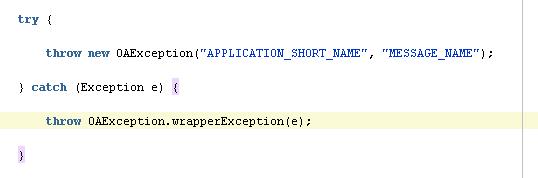
Catch exceptions within the controllers. When exceptions occur inside the application module, throw it back using

which means you also need to register your Exception messages in Oracle Apps


something like this @w@;; but I think you could do away with the catch block, unless you wanted to do something before the OAException object is finally thrown back to the controller.

B. Logging the Errors

syntax: pageContext.writeDiagnostics(String module, String messageText, int logLevel)

where the parameter module could be getClass.getName() + ".processFormRequest" (or ".processRequest"), so it will dynamically print out the class name regardless where you call it.

message could be any String  I guess @w@ use it with discretion. (limited to 4000 characters according to the documentation)

logLevel value could be referenced from OAFwkConstants (just noticed Fwk = framework @w@). So in cases you want to log Excpetion details, use OAFwkConstants.EXCEPTION which is numerically equivalent to 4.


in the example syntax, I used an instance of OAPageContext which is available for controllers. If in case you want to log things inside the application module you need to use an instance of OADBTransaction which has the same method.

sources:
The Digital Space

Thursday, January 20, 2011

Nested PLSQL Exceptions


well, it's possible to do this; but you might want to avoid using this approach @w@;;;

Wednesday, January 19, 2011

FND_GLOBAL

SELECT  FND_GLOBAL.EMPLOYEE_ID
FROM    DUAL

EMPLOYEE_ID - Return employee id of current user. Employee_id is a foreign key to PER_PEOPLE_F.PERSON_ID

CREATE OR REPLACE PACKAGE "FND_GLOBAL"

"The server-side package APPS.FND_GLOBAL returns the values of system globals, such as the login/signon or "session" type of values. You should not use FND_GLOBAL routines in your forms (that is on the client side). On the client side, most of the procedures in the FND_GLOBAL package are replaced by a user profile option with the same (or a similar) name. You should use FND_PROFILE routines in your forms instead." (from package documentation)

- in a sense this package must only be used on server side context
- a facility for accessing environment / DB session variables
- global variables, profile values, security context

procedure APPS_INITIALIZE(user_id in number, resp_id in number, resp_appl_id in number);
used for applications which are not directly integrated with Oracle Applications and need to establish  environment variables for it's DB session

Sets up global variables and profile values in a database session. Call this procedure to initialize the global security context for a database session.This routine should only be used when a session must be established outside of a normal form or concurrent program connection. (from package documentation)

function list:
function USER_ID return number;
function RESP_ID return number;
function RESP_APPL_ID return number;
function SECURITY_GROUP_ID return number;
function USER_NAME return varchar2;
function RESP_NAME return varchar2;
function APPLICATION_NAME return varchar2;
function APPLICATION_SHORT_NAME return varchar2;
function LOGIN_ID return number;
function CONC_LOGIN_ID return number;
function PROG_APPL_ID return number;
function CONC_PROGRAM_ID return number;
function CONC_REQUEST_ID return number;
function CONC_PRIORITY_REQUEST return number;
function PER_BUSINESS_GROUP_ID return number;
function PER_SECURITY_PROFILE_ID return number;
function LANGUAGE_COUNT return number;
function CURRENT_LANGUAGE return varchar2;
function BASE_LANGUAGE return varchar2;
function RT_TEST_ID return number;
function SECURITY_GROUP_ID_POLICY(d1 varchar2, d2 varchar2) return varchar2;
function AUDIT_ACTIVE return BOOLEAN;
function Lookup_Security_Group(lookup_type in varchar2, view_application_id in number) return number;
function Get_Session_Context return number;
function Compare_Session_Context(context_id in number) return boolean;
function Assert_No_Pool return boolean;
function EMPLOYEE_ID return number;
function CUSTOMER_ID return number;
function SUPPLIER_ID return number;

function FORM_ID return number;
function FORM_APPL_ID return number;
function CONC_PROCESS_ID return number;
function CONC_QUEUE_ID return number;
function QUEUE_APPL_ID return number;
function SESSION_ID return number;
function SERVER_ID return number;
function ORG_ID return number;
function ORG_NAME return varchar2;
function PARTY_ID return number;
function NLS_LANGUAGE return varchar2;
function NLS_NUMERIC_CHARACTERS return varchar2;
function NLS_DATE_FORMAT return varchar2;
function NLS_DATE_LANGUAGE return varchar2;
function NLS_TERRITORY return varchar2;
function NLS_SORT return varchar2;


sources:
murthy
appsbi

todo: expound v0.3

Tuesday, January 18, 2011

Mapping Application Short Name to Application Name


For some reason, the APPLICATION_SHORT_NAME and APPLICATION_NAME of registered applications in R12 are stored in separate DB tables : FND_APPLICATION and FND_APPLICATION_TL

R12 Workflow Notifications Status Monitor

Most of the time it takes a longer time to receive workflow notifications from the email server - so it's better to check them using the R12 administration pages.


under the System Administrator menu, you'll find the Workflow : Administrator Workflow > Status Monitor link


search for your workflow notfication by supplying the paramters


select an entry and click on the Activity History button


on the lower part of the Activity History screen, click the Notification icon


you'll finally able to view the contents of the generated notification email

R12 Responsibilities (OAF)

encountering an error like this means that your user profile doesn't have the assigned responsibility needed to access the page. You can view a responsibility as R12's version of user groups that define which users can access menus, pages, etc of the application.


tbc

Monday, January 3, 2011

Breaking the Haitus

Holidays are over ^^ There are still many things I need to test with PLSQL, so I'll be posting more soon XD

皆さまにあけましておめでと^^!!

Tuesday, December 7, 2010

VARCHAR2 SQL > 4000 bytes

My requirement was to produce a result set from a custom SQL (data is not from a table) which could have hundreds of rows @A@

For that, I created an SQL builder that concatenates UNION-ed SELECT statements which in the end exceeded 4000 bytes. Unfortunately VARCHAR2 only allows up until that point. The solution was to change my variable's data type to CLOB? not quite. REF CURSORs doesn't OPEN to CLOBs and TO_CHAR doesn't do the trick either TwT uhuhu

---

update:

so the final solution was to use a GLOBAL TEMPORARY TABLE


The ON COMMIT DELETE ROWS part purges the table when you issue the command COMMIT


instead of creating a mega-SQL, you'll just need to insert into a GLOBAL TEMPORARY TABLE just like above; then OPEN the REF CURSOR using a SELECT * statement FROM that Global Temporary Table ^^ pretty neat <3

All I need to do is convert this procedure into a function then return that REF CURSOR ^^/

(TBC clarify)

Monday, December 6, 2010

Binding Variables from Java to PLSQL


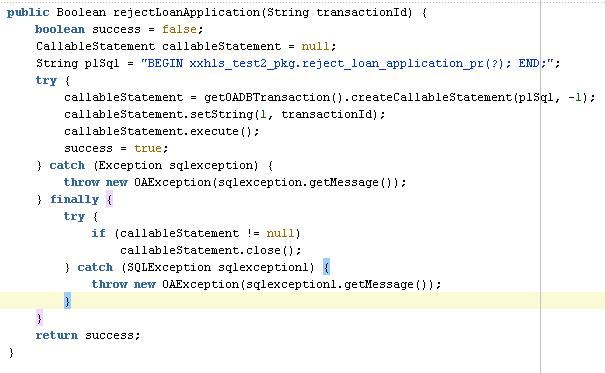
Probably most callable statement constructors are the same; what you need to take note of is the PLSQL String. The order of "?" characters denotes the index of the variable you want to bind. In the example, we want to bind a Java String to the PLSQL call. (Strings maps to VARCHAR in Oracle).

callableStatment.setString(1, transactionId);

The index starts with 1 (unlike for other data constructs which start at 0)

(side note: the callableStatement.execute() method returns a boolean : true - if the procedure/function returns a value or resultset; otherwise false .. this is just to clarify that this doesn't denote if the execution has been successful or not)

(TBC)